搜索
搜索模版名称不指定默认为 search.htm 且只能在对应模版的根目录下,不能在模板目录的子目录下,对应的固定地址是/mcms/search.do
Tip
搜索模板是动态生成,不需要静态化即可看到效果
默认模版参考:
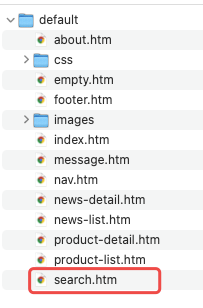
Tip
search.htm必须在当前模版的第一级目录,不能将search.htm放到imagescss或者其他的子目录
搜索参数
| 参数 | 必填 | |
|---|---|---|
| tmpl | 可选 | 模版文件名,默认search.htm |
| content_title | 必填 | 搜索标题,也可以搜索文章内容的其他字段例如:content_keyword、content_author、content_source、content_type、content_description、content_tag、content_details 还有content_datetime的范围等 |
| categoryIds | 可选 | 可搜索的栏目范围,多个栏目id直接逗号隔开且必须逗号结尾。例如:单个栏目搜索 "1" ; 多个栏目搜索 "1,2,3,4" 。如需要搜索自定义模型 的表数据,只能设置一个栏目编号 |
| content_type | 可选 | 文章属性,多个以逗号分开,例如:"c,f" |
| style | 必填(政企) | 企业版本、政府版本为必填,对应具体的模版文件夹名称,可以根据不同的皮肤效果制作不同的搜索页面结果页 |
Tip
categoryIds可以指定某一个父级栏目来搜索。如需要搜索自定义模型的表数据,只能设置一个栏目编号。
范例
普通搜索
搜索表单
...
<form action="/mcms/search.do" method="post">
<input type="text" name="style" value="{ms:global.template/}">
<input type="text" name="content_title" placeholder="请输入关键字">
<input type="text" name="content_type" placeholder="文章属性,多个以,分隔">
<input type="text" name="categoryIds" placeholder="请输入栏目id,多个以,分隔">
<!-- 对文章发布时间进行范围搜索 -->
<input type="datetime-local" name="content_datetime_start">
<input type="datetime-local" name="content_datetime_end">
<!-- 可在此处指定不同搜索模板 -->
<input type="hidden" name="tmpl" value="search.htm" />
<input type="submit" value="搜索">
</form>
...
Tip
如果需要多个搜索页面,可以拷贝search.htm,并在搜索表单指定tmpl属性值
搜索结果页 search.htm
<!-- 在搜索模板,通过${search.搜索表单的name值},获取表单传递的值 -->
<div class="ms-content-main-div-prompt">您搜索的关键字
<span>${search.content_title}</span>
<span>${search.content_datetime_start?replace('T',' ')}
</div>
<!-- 搜索结果列表 -->
{ms:arclist size=10 ispaging=true orderby="hit" order="desc"}
<a href="{ms:global.html/}${field.link}">
${field.title}
</a>
{/ms:arclist}

<div class="ms-content-main-page">
<a href="{ms:page.index/}">首页</a>
<a href="{ms:page.pre/}">上一页</a>
<a href="{ms:page.next/}">下一页</a>
<a href="{ms:page.last/}">末页</a>
</div>
Tip
这里的分页不需要拼接
{ms:global.html/}; 通过${search.content_title}可以获取搜索关键字 ;
采用 element-ui 的分页 效果
<!--网络请求框架-->
<script src="/static/plugins/axios/0.18.0/axios.min.js"></script>
<script src="/static/plugins/qs/6.6.0/qs.min.js"></script>
<script src="/static/plugins/ms/1.0.0/ms.js"></script>
<script src="/static/plugins/ms/1.0.0/ms.http.js"></script>
<script src="/static/plugins/ms/1.0.0/ms.util.js"></script>

<!--引入库-->
<script type="text/javascript" src="/static/plugins/vue/2.6.9/vue.min.js"></script>
<script src="/static/plugins/element-ui/2.12.0/index.js"></script>
<link rel="stylesheet" href="/static/plugins/element-ui/2.12.0/index.css">

<div id="app">


<!-- 搜索结果列表 -->
<#assign isEmpty=true>

{ms:arclist size=10 ispaging=true}
<!--标记搜索记录不为空-->
<#assign isEmpty=false>
    <a href="{ms:global.html/}${field.link}">${field.title}</a>
{/ms:arclist}
<!-- 搜索结果为空时候展示 -->
<#if isEmpty>
    没有找到 "${search.content_title}" 相关记录
</#if>

    <el-pagination
        background
        @current-change="handleCurrentChange"
        :page-size="pageSize"
        :current-page.sync="pageCur"
        layout="prev, pager, next, jumper"
        :total="contentCount">
    </el-pagination>
</div>
<script>
var app = new Vue({
    el: '#app',
    data: {
        //当前页数
        pageCur: ${(page.cur)!1},
        //每页文章条数
        pageSize: ${(page.size)!20},
        //页数总数
        pageTotal: ${(page.total)!0},
        //内容总数
        contentCount: ${(page.rcount)!0},
        // 搜索关键字
        keyword: "{ms:search.content_title/}",
        categoryIds: "{ms:search.categoryIds/}"
    },
    methods: {
        handleCurrentChange:function(val) {
            var form = document.createElement("form");
            form.setAttribute("method", "post");
            var input = document.createElement('input');
            input.setAttribute('type', 'hidden');
            input.setAttribute('name', 'size');
            input.setAttribute('value', this.pageSize);
            form.append(input);
            input = document.createElement('input');
            input.setAttribute('type', 'hidden');
            input.setAttribute('name', 'pageNo');
            input.setAttribute('value', val);
            form.append(input);
            input = document.createElement('input');
            input.setAttribute('type', 'hidden');
            input.setAttribute('name', 'content_title');
            input.setAttribute('value', this.keyword);
            form.append(input);
            input = document.createElement('input');
            input.setAttribute('type', 'hidden');
            input.setAttribute('name', 'categoryIds');
            input.setAttribute('value', this.categoryIds);
            form.append(input);
            input = document.createElement('input');
            input.setAttribute('type', 'hidden');
            input.setAttribute('name', 'style');
            input.setAttribute('value', '{ms:global.template/}');
            form.append(input);
            form.setAttribute("action","/mcms/search.do");
            document.body.appendChild(form);
            form.submit();
            form.remove();
        },
    }
})
</script>
Tip
这里采用的是动态创建表单的方式搜索,具体参考默认模版的
search.htm模版
栏目绑定自定义模型搜索
Tip
对自定义模型的字段进行搜索,必须传递栏目id且只能传递叶子栏目(没有子栏目)id
搜索表单
...
<form action="/mcms/search.do" method="post">
    <!-- 企业版政务版必须参数字段 -->
    <input type="text" name="style" value="{ms:global.template/}">

    <input type="text" name="categoryIds" placeholder="请输入绑定文章模型的栏目id,只能指定一个">

    <!-- 这里的name是自定义模型字段的field,在自定义模型->表单预览->字段信息中获取field,支持模糊搜索-->
    <input type="text" name="TEST_USE" placeholder="自定义模型字段的值,栏目绑定模型后在文章表单页可进行设置">

    <!-- 可在此处指定不同搜索模板 -->
    <input type="hidden" name="tmpl" value="search.htm" />
    <input type="submit" value="搜索">
</form>
...
搜索结果页
<!-- 在搜索模板,通过${search.搜索表单的name值},获取表单传递的值 -->
<div class="ms-content-main-div-prompt">您搜索的关键字
    <span>${search.TEST_USE}</span>
</div>
<!-- 搜索结果列表 -->
{ms:arclist size=10 ispaging=true}
    <a href="{ms:global.html/}${field.link}">
        <!-- 通过field.自定义模型字段的field,获取当前模型字段的值 -->
        ${field.title}--${field.TEST_USE}
    </a>
{/ms:arclist}

<div class="ms-content-main-page">
    <a href="{ms:page.index/}">首页</a>
    <a href="{ms:page.pre/}">上一页</a>
    <a href="{ms:page.next/}">下一页</a>
    <a href="{ms:page.last/}">末页</a>
</div>
搜索自定义模型并展示其他不受搜索参数影响的文章(6.2.0 及以上版本)
场景:搜索页面展示 搜索结果文章 + 推荐文章
搜索表单同上,搜索结果页如下
<!-- 在搜索模板,通过${search.搜索表单的name值},获取表单传递的值 -->
<div class="ms-content-main-div-prompt">您搜索的关键字
    <span>${search.TEST_USE}</span>
</div>
<!-- 搜索结果列表 -->
{ms:arclist size=10 ispaging=true}
    <a href="{ms:global.html/}${field.link}">
        <!-- 通过field.自定义模型字段的field,获取当前模型字段的值 -->
        ${field.title}--${field.TEST_USE}
    </a>
{/ms:arclist}

<div class="ms-content-main-page">
    <a href="{ms:page.index/}">首页</a>
    <a href="{ms:page.pre/}">上一页</a>
    <a href="{ms:page.next/}">下一页</a>
    <a href="{ms:page.last/}">末页</a>
</div>

<!-- 在搜索页面 展示非搜索结果的文章 推荐加上 scope=true 参数 -->
{ms:arclist flag='c' scope=true}
${field.title} <br>
{/ms:arclist}